Ranges, windows and denominators
Inside the AviatorTrends Live AI Forecast
“AI predictor” is easy to advertise and hard to define. AviatorTrends shows several models, several windows, forecast ranges, historical hit rates and sample counts. That is more information. It needs a short explanation.
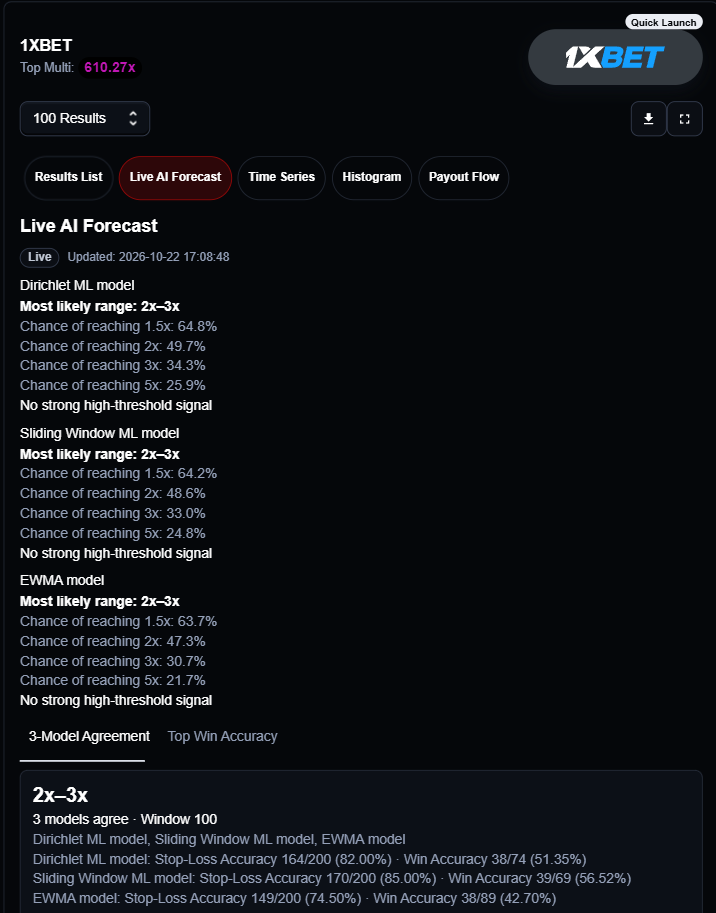
A range, not an exact multiplier
Crash data are skewed: many low results and a few very large ones. A screenshot of 7.42× looks sharp and still fails over a full history. AviatorTrends places multipliers into ranges so a forecast can be tested.
Three models, different memory
- Sliding window: counts what happened in the last 30, 100 or similar rounds. Fast, noisy.
- EWMA: updates a probability estimate over chronological chunks. Recent data moves it; older data is not thrown away.
- Decay-Dirichlet: older counts fade, and a prior keeps empty bins from being treated as impossible.
A short window reacts quickly. A long window is calmer. If window 30 and window 300 disagree, that disagreement is the signal.
| Stop-Loss Accuracy | Actual range was equal to or above the predicted range in walk-forward tests |
|---|---|
| Win Accuracy | Actual multiplier reached the lower edge of the predicted range, on qualifying rows |
| Qualifying sample | At least 30 qualifying predictions before a row ranks in Top Historical Win Accuracy |
Walk-forward testing
For each historical position the model trains only on earlier observations. The value being scored is not in its training window. That is how the percentages are built.
Live means the predictions socket delivered the current snapshot or a streamed update. Cached is the HTTP fallback until that payload arrives.
Open the Live AI Forecast tab on AviatorTrends.
More guides
Read also Master Spribe Aviator and Crash Games with AviatorTrends